
Time and attendance for payroll providers
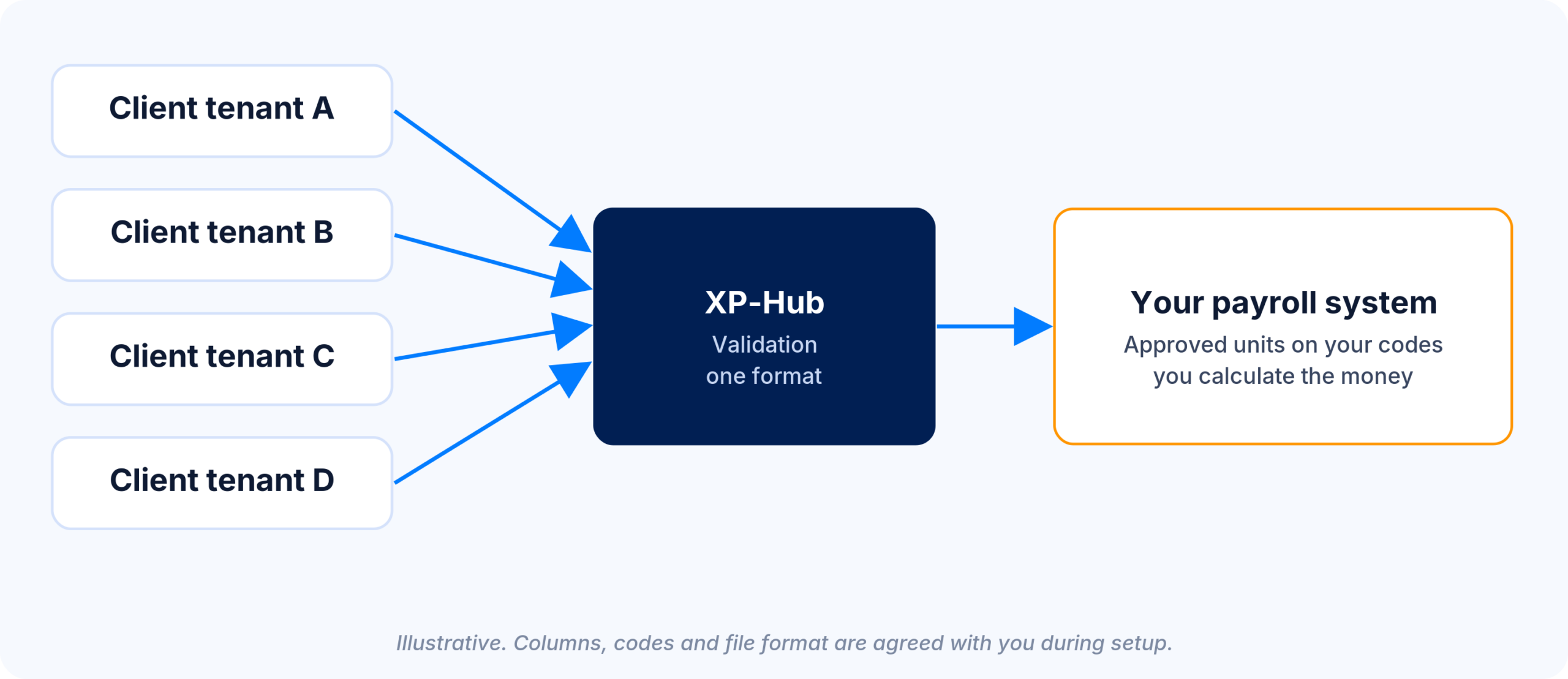
Client hours often arrive late, unapproved and in spreadsheets. XperienceHR records working time under each country’s rules and sends partners approved units on their own pay codes, one file per run, with corrections as deltas. Partners calculate the amounts. XperienceHR does not run payroll.
Workday, SAP and ADP integrations · Payroll integration via XP-Hub · 15 years powering global payroll
What does a payroll provider receive each run?
Each run, the payroll provider receives approved units per employee on its own pay codes, with the run type and a delta flag for corrections.
Illustrative sample. Columns, codes and file format are agreed with each partner during setup.
| Employee ID | Period | Pay code | Unit | Value | Run type | Delta |
|---|---|---|---|---|---|---|
| 104512 | 2026-03 | 1000 Regular hours | hours | 152.00 | main | no |
| 104512 | 2026-03 | 1210 Overtime | hours | 6.50 | overtime | no |
| 104512 | 2026-03 | 1500 Call-out | units | 1 | overtime | no |
| 104512 | 2026-03 | AL Annual leave | days | 2.5 | main | no |
| 104512 | 2026-02 | 1210 Overtime | hours | −0.50 | main | yes |
A separate working-days file carries actual, total and calendar working days per employee and period for salary proration. Off-cycle runs get their own file, and a delta file holds only the corrected records. Country rules, collective agreements and overtime and premium logic are applied at the source, while gross-to-net stays with the partner.
Benefits for payroll providers
Approved before it reaches payroll
Managers approve at month-end, hard stops block approval while exceptions are open, and only approved overtime is sent.
Corrections as deltas
Delivered periods are frozen. Later changes arrive as delta entries with audit, and a pre-delivery reconciliation can block delivery when figures do not match.
Integrate once, serve many
XP-Hub connects any payroll or HR system in both directions, in any format (JSON, SFTP, REST API). One integration layer serves multiple payroll endpoints, so a partner format set up once is reused for each client on XperienceHR.
A record clients can show
Each client gets a daily working-time record with a full audit trail of entries, corrections and approvals.
Who owns which data, and how often does it sync?
The client HR system owns people data, XperienceHR owns time records and approvals, and the partner owns pay calculation. HR data typically syncs daily, and approved time goes out per payroll run.
| Data | Owner | Flow and cadence |
|---|---|---|
| Employees, contracts, organisation | Client HR system | Into XperienceHR, typically daily as a full snapshot plus changes |
| Time records, absence and approvals | XperienceHR | Out to the partner per run, off-cycle runs included |
| Corrections to delivered periods | XperienceHR | Delta file in the next delivery |
| Pay calculation, payment and statutory reporting | Partner | Not exchanged |
Records are matched on the employee identifier carried in the HR feed, and single sign-on can use the same identifier. Incoming HR data is validated, and mismatches are reported back to the sender.
Which partner types and models are available?
XperienceHR works with six partner types under three models: referral, reseller / bundled and embedded.
| Partner type | Client problem | What XperienceHR adds |
|---|---|---|
| In-country payroll providers and bureaus | Hours arrive late, in spreadsheets, unapproved | Approved units on its own pay codes by cut-off. Payroll providers → |
| Global payroll aggregators | Each in-country partner sends time in a different shape | One XP-Hub integration layer for multiple endpoints, with validation before the payroll cycle |
| EOR and global employment platforms | Employees are not supervised day to day by the employer of record | Country rules, a daily working-time record and an audit trail per employee |
| HR and payroll consultancies | Clients need time and attendance that follows local law and agreements | Configuration per country, legal entity, pay group and employee group in one tenant |
| Workday and SAP systems integrators | The HCM time module does not fit shift and deskless staff | Time and attendance alongside Workday (PECI) and SAP SuccessFactors |
| Payroll and HR BPO | Time is administered for many entities across borders | One tenant per client, role-based access and cross-border approvals. Payroll and HR BPO → |
In the reseller / bundled and embedded models, the partner gives first-line support and XperienceHR gives second-line support. Under referral, XperienceHR supports the client directly.
How does a client go live?
A client goes live in four steps, starting with one mapped scenario and a parallel run.
1. Map one client scenario: country rules, overtime and premium logic, pay codes and input format, documented for one real client.
2. Load the client: import templates for employees, rosters, work calendars and opening leave balances.
3. Run in parallel: one client country runs alongside the current payroll inputs until the outputs reconcile.
4. Roll out on the same template: further countries and clients follow, each with its own local rules.
Client security reviews are supported with SAML single sign-on, a full audit trail and ISO 27001 certification, and a DPA is available on request.
Frequently asked questions from partners
No. XperienceHR does not run gross-to-net payroll or pay employees. It records working time, applies country rules and sends approved units on the partner’s pay codes.
Through XP-Hub, the XperienceHR integration platform. XP-Hub connects any payroll or HR system in both directions, in any format (JSON, SFTP, REST API). Corrections after delivery arrive as delta files.
Yes. Approved units are delivered per payroll run, including an overtime run, the main run and off-cycle runs, plus a working-days file for salary proration.
Referral, reseller / bundled and embedded. The commercial model is agreed individually.
XperienceHR is ISO 27001 certified, with SAML single sign-on, role-based access, TLS and AES encryption and a full audit trail. A DPA and documentation for security reviews are available on request.
Partnership enquiries
Partnership enquiries cover the clients and countries served and the current payroll data flow. The response includes a client scenario mapped to the partner’s codes and a sample file in its format.
Contact: info@xperiencehr.com · +421 905 440 035 · USA +1 646 926 0897